 Skip to content


Dell Optiplex 7010 vs. 9010
The decision between the Dell Optiplex 7010 vs. 9010 can feel daunting if you’re not fully aware of what each model offers. Both are popular in business settings, thanks to their reliability and performance, but their subtle differences in processors, expandability, and form factors can tip the scales in one direction or the other. Below, we’ll dissect these two series—covering everything from base specs to upgrade pathways—so you can find the ideal workstation for your team.
First Look: Dell Optiplex 7010 vs. 9010
Dell Optiplex 7010 Overview
The Dell Optiplex 7010 is a well-balanced workstation that excels in day-to-day business tasks. Equipped with Intel Core processors (often from the 3rd generation i5 or i7 lineup), it’s perfectly suited for word processing, light graphic design, and general office multitasking. Known for its sturdy build and easy-to-upgrade components, the 7010 can accommodate extra RAM and storage without much hassle. Plus, the variety of form factors—from mini-tower to small form factor—ensures there’s an option that fits snugly into your workspace.
Dell Optiplex 9010 Overview
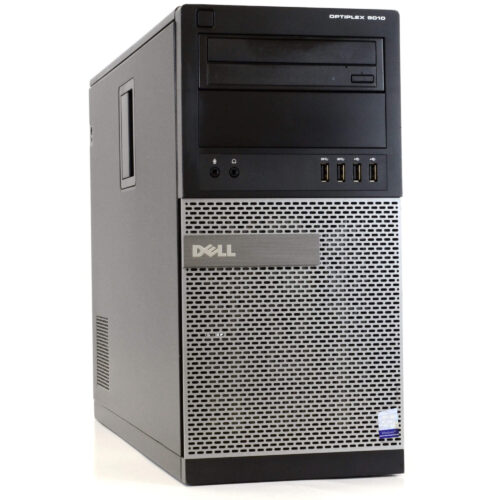
Meanwhile, the Dell Optiplex 9010 caters to professionals who need a bit more horsepower and security. Featuring robust chipset options, the 9010 can handle heavier multitasking loads and often comes with expanded BIOS-level security features. It’s ideal if your workflow involves juggling multiple complex applications or if data protection is a top priority in your office environment. Like the 7010, the 9010 also offers several chassis sizes, making it versatile for both cramped cubicles and spacious desks.
Key Specs at a Glance
When comparing the Dell Optiplex 7010 vs. 9010, it helps to see their specifications side by side. Below is a snapshot of where each excels, though exact specs can vary depending on the specific configuration you purchase.
| Specification | Dell Optiplex 7010 | Dell Optiplex 9010 |
|---|---|---|
| Processor Options | Intel Core i3/i5/i7 (3rd Gen) | Intel Core i5/i7 (3rd Gen) |
| Max RAM | Up to 16 GB DDR3 (some configs support 32 GB) | Up to 16 GB or 32 GB DDR3 (depending on chipset) |
| Storage | Supports HDD or SSD (SATA III) | Supports HDD or SSD (SATA III) |
| Graphics | Integrated Intel HD Graphics 2500/4000 | Integrated Intel HD Graphics 2500/4000 (some have dedicated GPU options) |
| Form Factors | Mini-Tower, Small Form Factor, Ultra Small Form Factor | Mini-Tower, Small Form Factor, Ultra Small Form Factor |
| Security Features | Basic BIOS security, optional TPM | Advanced BIOS management, often includes TPM |
| Ports | Multiple USB 2.0/3.0, DisplayPort, VGA, Ethernet | Multiple USB 2.0/3.0, DisplayPort, VGA, Ethernet |
| Operating System | Windows 7/10 (upgradable options), Linux | Windows 7/10 (upgradable options), Linux |
| Recommended Use Case | General office workloads, moderate multitasking | Advanced multitasking, security-conscious environments |
| Warranty (Refurb) | Varies, typically 3-6 months from refurb sellers | Varies, typically 3-6 months from refurb sellers |
Performance and Upgrades
Both the 7010 and 9010 can be upgraded with additional RAM and an SSD to significantly boost performance. However, the 9010 often has a slight edge due to enhanced BIOS settings and some additional security features. If your company handles sensitive data or has stricter IT policies, the 9010 might be worth the extra investment.
Maintenance and Upkeep
One reason many small businesses choose Dell Optiplex series PCs is their tool-less design, which simplifies upkeep. Need to replace a fan or pop in a new HDD? Most internal components are accessible without special tools. If you’re ever unsure about repairs, you can always look into technical support resources at White Spider Electronics for guidance or professional assistance. Regular cleaning and updates to drivers or firmware can keep either model humming for years.
Which One Should You Pick?
Consider Your Work Habits
Think about the tasks you handle most. If you’re in a small office setting where employees do basic emailing, document editing, and occasional media playback, the 7010 should handle those duties smoothly. But if you work in finance, design, or other resource-intensive fields—where multi-threaded applications or frequent virtualization might come into play—the 9010 could give you a more seamless experience.
Long-Term Cost Efficiency
While both models can be found at competitive prices—especially as refurbished units—factoring in the cost of potential future upgrades is important. If you suspect your computing needs will grow in the near future, the more robust capabilities of the 9010 might save you from needing to upgrade again so soon. Either way, you can explore additional Dell resources or check out other refurb solutions at White Spider Electronics to see which configuration matches your budget and growth plans.
Final Word
Ultimately, the choice between the Dell Optiplex 7010 vs. 9010 hinges on the complexity of your daily workload, your security requirements, and your vision for future expansion. Both series deliver the reliable build quality and stable performance that Dell is known for. If you need a straightforward workstation with moderate capabilities, the 7010 should suffice. For more demanding environments, the 9010 steps up with stronger security and a higher performance ceiling. Assess your needs carefully, invest in the system that matches your office’s trajectory, and enjoy a hassle-free computing experience.